
This release mainly focuses on technical progress, security improvements, and groundwork for upcoming features. While there are no major functional deliveries this time, several important areas have been strengthened to improve stability, security, and future scalability.
❤️ = Users feedback
🚨 Global Information 🚨
Sharepoint Authentification : Migration from IDCRL to Modern OAuth Authentication
Publishing : End of Support
SharePoint Online Content Security : Policy Update
⭐ Foundation Pack ⭐
Event-Hub : Global rework :
- New Calendar Webpart ❤️
- Suggestion on registration : Add to calendar
- Interaction filters ❤️
- Registration deadline ❤️
- Waiting list ❤️
-
Multilingual behavior ❤️
Page Import/Export
Content Builder:
✈️ Boost Pack ✈️
- Content builder : AI-generated text direct integration
🚀 Advanced Pack 🚀
Analytics : Mail Export
📱 Mobile Application 📱
- Authentication & User Data
- Interface & Visual Identity
- Reliability & Stability
- Settings & Internal Architecture
-
Performance
🤖 Buddy 🤖
- Chatbot Webpart & Feature
- SharePoint Page Indexation
- SharePoint Knowledge Base User Permissions
-
Feedback Loop Improvements
🚨 Global Information 🚨
SharePoint Authentication:
Removed legacy authentication support in preparation for Microsoft's retirement of the IDCRL protocol (January 31, 2026). The application now exclusively uses modern OAuth authentication for all SharePoint connections.
Reference : Migrating from IDCRL authentication to modern authentication in SharePoint
Publishing : End of Support
Microsoft is retiring the classic Publishing model and the “Allow custom scripts” setting.
There’s no immediate impact for Powell customers — existing intranets will continue to run normally, as custom scripting is already managed on our side. If needed, scripting can still be temporarily re-enabled using Microsoft’s PowerShell script.
However, Microsoft will fully remove custom script support by March 2026, which means classic components (like Script Editor or custom layouts) will stop working.
To stay secure and supported, we recommend starting your migration to the modern SharePoint experience as soon as possible.
Reference: MC1117115 – Updates to custom scripting in sites and Classic Publishing site creation | Microsoft
SharePoint Online Content Security : Policy Update
To ensure Powell Manager and your intranet function correctly with SharePoint Online's Content Security Policy (CSP), trusted script sources must be configured.
This is critical to prevent issues with script execution and maintain compatibility with the latest security updates. Microsoft plans to enforce script blocking for non-compliant scripts on March 1st, 2026.
Why This Matters ?
SharePoint Online's Content Security Policy enhances security by restricting script sources to trusted domains. Starting March 1st, 2026, scripts not listed in the trusted sources will be blocked, which could cause Powell Manager and your intranet to malfunction, significantly impacting user experience and productivity.
If these configurations are not completed before the enforcement date, scripts will no longer be accessible from your intranet, resulting in broken functionality.
Immediate action is recommended to avoid disruptions.
Key Actions :
Powell Software has automated the deployment of trusted script sources to minimize manual actions. Two configuration methods are available depending on your environment:
-
Option 1: Automated Configuration (Recommended)
Powell Manager can automatically configure the trusted script sources through a background job during deployment.
Prerequisites: SharePoint Administrator permissions are requiredAccess to Powell Manager administration console
Steps to Configure: Launch an SPFx Extension synchronization. The background job will automatically update the authorized scripts in your SharePoint tenant
-
Option 2: Manual Configuration
If automated configuration is not possible (e.g., insufficient SharePoint Administrator permissions), trusted script sources must be configured manually through the SharePoint Admin Center.
-
Steps to Configure Manually:
Navigate to SharePoint Admin CenterAccess the Content Security Policy settings at: https://<tenant>-admin.sharepoint.com/_layouts/15/online/AdminHome.aspx#/contentSecurityPolicy
Add the following trusted script sources:
-
Required URLs:
Testing and Validation
After configuring the trusted script sources (either automatically or manually), verify that all Powell Manager features and intranet components function as expected
Recommended Validation Steps:
Test all custom web parts and dashboards
Verify navigation and search functionality
Check for script-related errors in the browser's developer console
Monitor user feedback for any functionality issues
References:
For more information on Content Security Policy in SharePoint Online, please refer to the official Microsoft documentation :
⭐ Foundation Pack ⭐
Event-Hub : Global rework
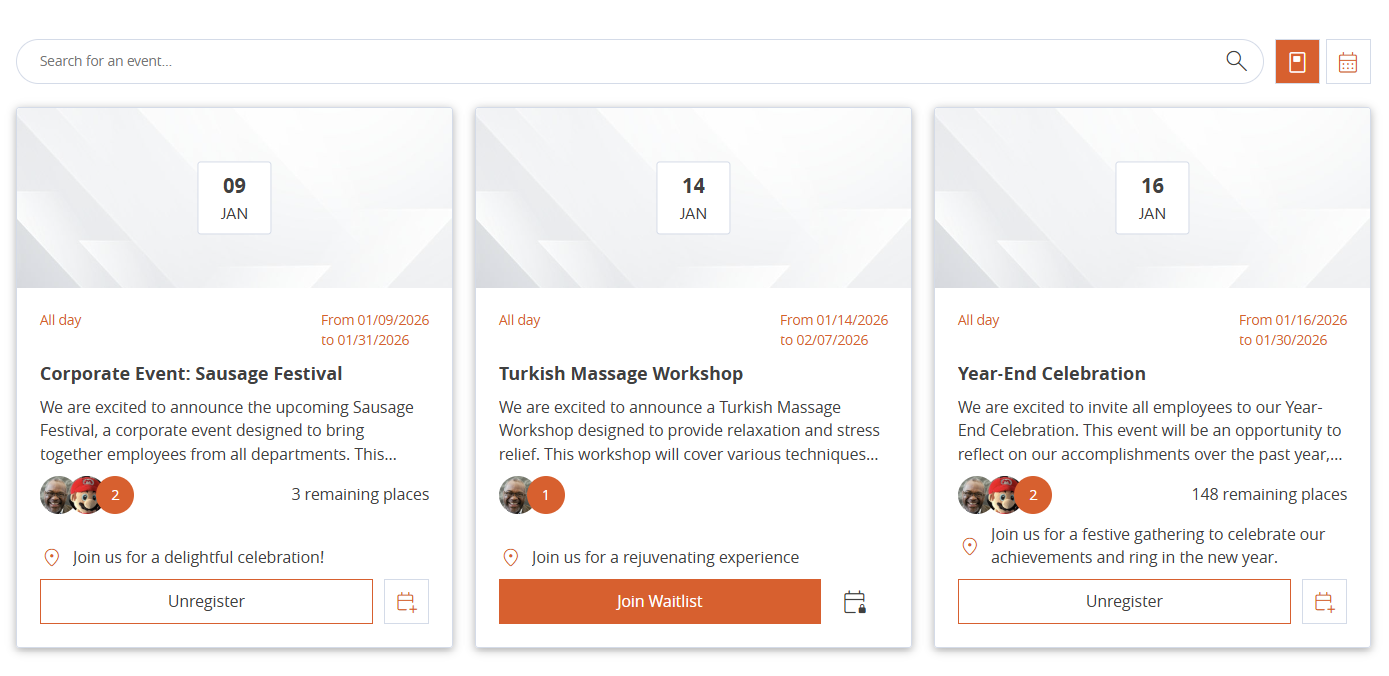
We’re excited to introduce the new Event webpart, designed to make discovering and managing events easier and more engaging. Users can now explore events through a card-based layout for quick browsing or switch to a calendar view for a clear, time-based overview.
|
|
|
The webpart includes several powerful features to enhance the registration experience:
Add to calendar
After registering for an event, users now see a confirmation modal that includes a clearly visible Add to calendar button. This option already existed before but was hard to find. It is now fully integrated into the registration flow, making it easier for users to save events and avoid missing them.
Interaction filter
The Event web part now offers interaction-based filters in Card view. Users can filter events they are registered for, events they liked, and events where they are on the waiting list. This helps users quickly find relevant events and better navigate large event lists. This feature is available for Card view only.
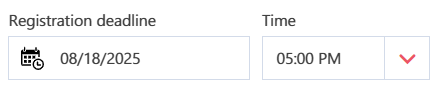
Registration deadlines
Set a deadline to automatically close event sign-ups. This helps manage attendance and ensures participants register on time.
Waiting list
Events reaching full capacity can now include a waiting list. If a spot becomes available, the first person on the list is automatically registered, eliminating manual management and ensuring fair access to popular events.
To enable the waitlist feature, you must create a Boolean field (for example, EventHubHasWaitlist) in the content type. This can be done either on the event hub list item or on the page template if it’s a page.
If the content type has already been deployed, you will need to run a synchronization again.
Once the field is deployed, you must map the new field to the webpart view. The field should be linked to the property enableWaitlist.
Multilingual behavior
The Events web part now supports multilingual configurations, making it easier to manage and display events in multilingual SharePoint environments.
Events can be separated and shown based on the page language, ensuring that users only see content relevant to their selected language and improving clarity, relevance, and overall user experience.
Incoming : Recurring events
This will be implemented in the Event-hub Template
Page Import/Export
Manual Export
Copy the page configuration code and paste it directly into Manager to recreate the page.
[Preview] - Automated Page Export
Contributors can now export any page directly from the front and send it to Manager . By clicking Create in the Export page configuration section, the current page’s configuration is copied and a new page is created in Manager.
Content Builder:
Required Updates :
- To get those evolutions, SPFX synchronization is required
The Content Builder webpart has been improved to give editors more flexibility and better control over page layouts.
Automatic save component with page
Content Builder configuration is now saved directly in the page state and always persists. This removes the risk of losing changes by forgetting to save the webpart configuration and allows each configuration update to be tracked through the page version history.
Overall, this greatly improves the reliability and handling of webpart configuration.
Shortcut action
The shortcut bar has been reworked to remove confusion between the Edit and + actions. Clicking on + now opens a dedicated pop-up listing the available blocks to add. This clarifies the content creation flow, as both actions previously opened the same panel.
Internal videos integration
Contributors can now add internal videos directly into Content Builder pages. When adding a video, they can define whether it is decorative or interactive.
Column section
A new Column block improves layout flexibility. Columns can contain other blocks and behave like a section within a section, enabling more complex and flexible page structures.
Move elements between section
Blocks can now be dragged and dropped freely between sections. This removes previous limitations when reorganizing page layouts and makes content restructuring much easier.
Section audiencing
Audience targeting is now available at section level. In edit mode, all sections remain visible to contributors. In preview and published modes, sections are displayed based on their audience settings. Existing Content Builder pages created before this update are set to public by default.
✈️ Boost Pack ✈️
Content builder : AI-generated text direct integration
AI-generated text is now directly integrated into Content Builder text blocks. Previously, the AI generation interface and text blocks were not synchronized, requiring manual copy and paste. This limitation has been removed.
A new Buddy shortcut is now available directly in the inline text editor (Froala), allowing users to generate AI content without leaving the editing context. This option is available only when Froala is configured in inline mode and requires an Boost license.
🚀 Advanced Pack 🚀
Analytics : Mail Export
It is now possible to export data to Advanced Analytics directly from the email. The email includes a link with limited access, which automatically allows the email recipient to download the file.
📱 Mobile Application 📱
Authentication & User Data
Improved handling of user information thanks to a more robust caching system.
Optimized refresh mechanisms to ensure a more reliable and continuous authentication experience.
Interface & Visual Identity
Updated the app icon colors and splash screen to align with Powell’s new, modern, and unified visual identity.
Reliability & Stability
Strengthened error-handling mechanisms and improved protection against null values to reduce unexpected issues.
Enhanced internal logging for a more stable application and easier monitoring.
Settings & Internal Architecture
Refactored the Settings page for smoother navigation and a more consistent internal structure.
Performance
Implemented a secure caching system to improve loading performance and overall reliability.
🤖 Buddy 🤖
Chatbot Webpart & Feature
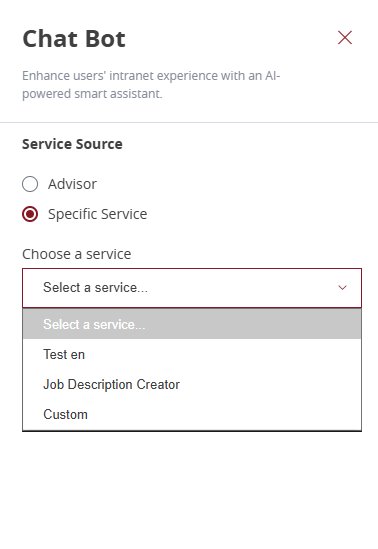
We are have introducing a new Chatbot webpart that centralizes AI service management. Administrators can now select and configure AI services directly within the settings
This update is a prerequisite for launching more specialized, thematic chatbot scenarios (such as HR or IT assistants) in specific pages
It also come with a new Feature, allowing to enable the bot on the whole site collection
SharePoint Page Indexation
You can now index SharePoint pages and use their content directly in your knowledge bases.
This makes existing intranet content usable by agents, alongside documents, for richer and more reliable answers.
Action required
This feature is available once knowledge base indexing is configured using a Cosmos DB (Powell-managed or hosted in your environment).
SharePoint Knowledge Base User Permissions
Agents can now respect SharePoint user permissions when querying SharePoint-based knowledge bases.
Responses are automatically personalized based on each user’s SharePoint access rights, ensuring content is only surfaced to authorized users. Shared permissions remain available if you want the knowledge base to be accessible to all users.
Action required
This feature is available once knowledge base indexing is configured using a Cosmos DB (Powell-managed or hosted in your environment).
Feedback Loop Improvements
End users now have more options when providing feedback on agent responses, including the ability to submit positive feedback.
Administrators gain access to richer feedback details, making it easier to iterate on agents and continuously improve their relevance based on real business usage.